
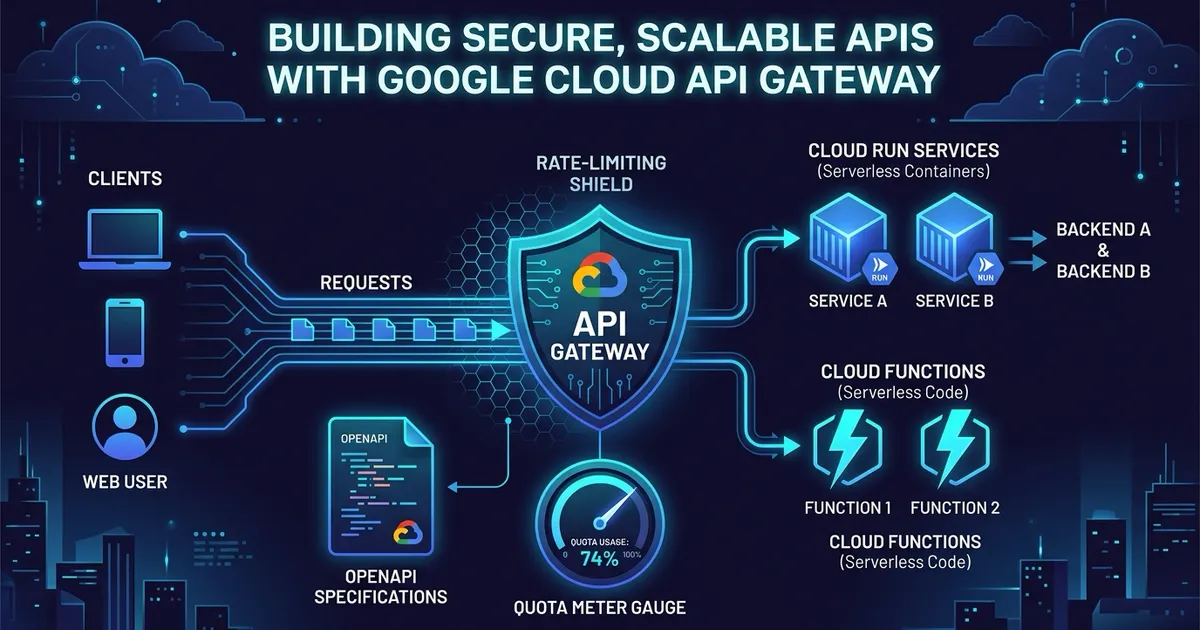

Google Cloud API Gateway lets you put a single managed domain in front of multiple serverless backends like Cloud Run and Cloud Functions. It validates API keys, routes incoming URLs, and rejects traffic that exceeds your configured quotas before those requests hit your application code and run up your compute bill.
This guide walks through multi-backend routing and rate limiting with concrete OpenAPI 2.0 and OpenAPI 3.0 specifications, along with the operational quirks you need to know before deploying them to production.
1. Multi-backend routing
A common setup is splitting traffic by URL path, sending /users to a containerized Cloud Run service while routing /orders to a Cloud Function.
API Gateway handles this through backend extensions. In OpenAPI 3.x, you define backends globally and reference them by name in your paths. In OpenAPI 2.0, you specify backend URLs directly on each operation.
openapi: 3.0.3info: title: Multi-Backend API Gateway description: Routing traffic to multiple serverless backends using OpenAPI 3.x version: 1.0.0
# 1. Define the API Gateway endpoint propertiesservers: - url: https://example.com x-google-endpoint: {}
# 2. Define reusable backend references globallyx-google-api-management: backends: users-service: address: https://users-service-xyz.a.run.app # Optional: set jwtAudience when using deterministic URLs for revisions jwtAudience: https://users-service-xyz.a.run.app orders-service: address: https://us-central1-myproject.cloudfunctions.net/orders
paths: # 3. Route specific paths to their designated backend /users: get: summary: Get all users from Cloud Run operationId: getUsers x-google-backend: backend: users-service responses: '200': description: Success
/orders: post: summary: Create an order via Cloud Function operationId: createOrder x-google-backend: backend: orders-service responses: '200': description: Successswagger: '2.0'info: title: Multi-Backend API Gateway description: Routing traffic to multiple serverless backends using OpenAPI 2.0 version: 1.0.0schemes: - httpsproduces: - application/json
paths: /users: get: summary: Get all users from Cloud Run operationId: getUsers x-google-backend: address: https://users-service-xyz.a.run.app jwt_audience: https://users-service-xyz.a.run.app responses: '200': description: Success
/orders: post: summary: Create an order via Cloud Function operationId: createOrder x-google-backend: address: https://us-central1-myproject.cloudfunctions.net/orders responses: '200': description: SuccessKey rules for OpenAPI 3.x on GCP
- Global backend definitions. You must declare your reusable backends in
x-google-api-management.backendsat the document root. - Path mapping. Use
x-google-backendinside path operations and setbackend:to the target name defined in your global block. - Single endpoint server. OpenAPI 3.x supports multiple servers, but GCP API Gateway only reads the single server containing the
x-google-endpoint: {}extension. - Trailing slashes. API Gateway treats
/usersand/users/as distinct paths without automatic redirection. Always map the non-trailing slash version unless you explicitly configure both.
2. Enforcing quotas and rate limits
API Gateway enforces quotas per consumer project rather than per IP address. Setting this up takes three steps.
Step 1. Require API keys for consumer identification
Because quotas track usage per Google Cloud consumer project, requests must supply an API key. API Gateway maps the key back to the caller project to calculate remaining quota.
openapi: 3.0.3info: title: Quota Enforced API version: 1.0.0
# 1. Define the security scheme for API keyscomponents: securitySchemes: api_key: type: apiKey name: key in: query
# Apply security globally or on specific methodssecurity: - api_key: []swagger: '2.0'info: title: Quota Enforced API version: 1.0.0
# 1. Define the security definition for API keyssecurityDefinitions: api_key: type: apiKey name: key in: query
# Apply security globally or on specific methodssecurity: - api_key: []Step 2. Define metrics and quota limits
Define the named metric and its rate allowance. In OpenAPI 3.x, use x-google-api-management at the document root. In OpenAPI 2.0, use x-google-management.
# 2. Define the metric and the limit in OpenAPI 3.0x-google-api-management: metrics: - name: "read-requests" displayName: "Read Requests Metric" quotas: limits: - name: "read-limit-per-minute" metric: "read-requests" allowance: 100 period: "1m" # Allowed values: 1m (per minute) or 1d (per day)# 2. Define the metric and the limit in OpenAPI 2.0x-google-management: metrics: - name: "read-requests" displayName: "Read Requests Metric" valueType: INT64 metricKind: DELTA quota: limits: - name: "read-limit-per-minute" metric: "read-requests" unit: "1/min/{project}" values: STANDARD: 100Step 3. Attach the quota to an API operation
Bind individual operations to your metric with x-google-quota and declare how many units each call costs.
paths: /items: get: summary: List items operationId: listItems # 3. Deduct 1 unit from read-requests per call x-google-quota: metricCosts: "read-requests": 1 responses: '200': description: Successpaths: /items: get: summary: List items operationId: listItems # 3. Deduct 1 unit from read-requests per call x-google-quota: metricCosts: "read-requests": 1 responses: '200': description: Success3. Complete production example
Here is a full inventory service configuration combining backends, API key authentication, and rate limiting in a single file.
openapi: 3.0.3info: title: Secure Inventory API description: API Gateway configuration with Cloud Run backend and per-minute quotas version: 1.0.0
servers: - url: https://example.com x-google-endpoint: {}
x-google-api-management: backends: inventory-backend: address: https://inventory-service-xyz.a.run.app metrics: - name: "inventory-reads" displayName: "Inventory Read Actions" quotas: limits: - name: "per-minute-limit" metric: "inventory-reads" allowance: 60 period: "1m"
components: securitySchemes: api_key: type: apiKey name: key in: query
paths: /v1/products: get: summary: Retrieve all products operationId: getProducts security: - api_key: [] x-google-quota: metricCosts: "inventory-reads": 1 x-google-backend: backend: inventory-backend responses: '200': description: OK content: application/json: schema: type: array items: type: object properties: id: type: string name: type: stringswagger: '2.0'info: title: Secure Inventory API description: API Gateway configuration with Cloud Run backend and per-minute quotas version: 1.0.0schemes: - httpsproduces: - application/json
x-google-management: metrics: - name: "inventory-reads" displayName: "Inventory Read Actions" valueType: INT64 metricKind: DELTA quota: limits: - name: "per-minute-limit" metric: "inventory-reads" unit: "1/min/{project}" values: STANDARD: 60
securityDefinitions: api_key: type: apiKey name: key in: query
paths: /v1/products: get: summary: Retrieve all products operationId: getProducts security: - api_key: [] x-google-quota: metricCosts: "inventory-reads": 1 x-google-backend: address: https://inventory-service-xyz.a.run.app responses: '200': description: OK schema: type: array items: type: object properties: id: type: string name: type: string4. Operational behavior and quirks
Before relying on API Gateway quotas in production, keep these operational details in mind.
HTTP 429 on quota exhaustion
When a consumer runs out of quota, API Gateway cuts off the request upstream before forwarding it to Cloud Run or Cloud Functions:
HTTP/1.1 429 Too Many RequestsContent-Type: application/json
{ "code": 429, "message": "Resource has been exhausted (e.g. check quota)."}This prevents wasted compute, cold starts, and backend congestion from abusive callers.
Fail-closed behavior
For 4xx client-side quota and key validation errors, API Gateway fails closed. If an API key is missing or invalid, or if the calling project has exceeded its quota, the gateway drops the request immediately.
Proxy batching and the 30% accuracy margin
API Gateway checks quotas in local proxy memory to keep latency down. It does not make a synchronous network round-trip to a central counter on every incoming request.
Under sharp traffic bursts, expect an approximate 30% margin of error. A limit set to 100 requests per minute might allow 120 or 130 requests through before the proxies sync and start returning 429s. If you need hard, single-digit transaction limits, enforce them in your application layer with Redis or Cloud Spanner locks.
Safe metric updates
Note
Do not rename or delete active metrics in a live API configuration. If an incoming request targets a metric name missing from the current active gateway deployment, API Gateway throws an error immediately. Deploy a new API config alongside the existing one and verify traffic before switching over.